Radio equipment needs certification where you live (FCC, CE, UKCA, ISED, Anatel). Some devices are uncertified or restricted in Brazil. Buyers are responsible for their local law.
Bring along
A phone for messaging and the magnetic charging cable.
Keep in mind
Choose T1000-E for Meshtastic; the same-name LoRaWAN version uses different firmware.
Seeed publishes only a product datasheet/user guide for the T1000-E card tracker; no schematic, PCB source, or 3D files are published for the tracker itself.
Datasheet URL confirmed 200 via curl. Web search found no schematic/KiCad/Gerber files for the T1000-E card tracker; the similarly-named Seeed-Studio/Seeed-Tracker-T1000-E-for-LoRaWAN-dev-board GitHub repo is firmware/SDK examples only, not hardware design files, and covers the separate LoRaWAN dev-board SKU.
Every link checked 2026-09-27.
Hand this device to your agent. Everything on this page, as clean Markdown and JSON: specs, shops, prices, design files, parts.
−20 to 60 °C range; ±1 °C accuracy; 0.1 °C resolution
Light sensor
Relative 0–100% level
Motion
Three-axis accelerometer; support marked in development
Feedback
One LED and buzzer
Button
One press dismisses an alert; two send position; three toggle GPS; hold to shut down.
Notification pins
PWM buzzer GPIO25; LED GPIO24
Ringtones
External notifications accept an RTTTL ringtone configuration.
Power & body
8
Battery
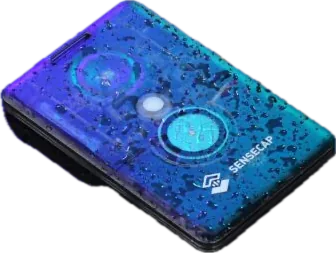
700 mAh; maker estimates up to two days, dependent on location interval, sensors, conditions and network.
Charging
Magnetic USB-A to four-pin cable, 1 m; adapter not included
Input & charging temperature
4.7–5.5 V DC; charge at 0–45 °C
Dimensions & weight
85 × 55 × 6.5 mm; 32 g
Protection
IP65
Environment
−20 to 60 °C; 5–95% RH non-condensing
Compliance
CE, FCC and RoHS listed
Charger selection
Seeed’s setup guide advises against fast chargers.
Firmware & setup
11
Model requirement
Use the T1000-E for Meshtastic model; T1000-A/B use different firmware.
Same-name LoRaWAN variant
T1000-E for LoRaWAN is also sold. Seeed warns against flashing Meshtastic or MeshCore firmware to it.
Updates
USB DFU/UF2; maker warns against NRF-OTA
Telemetry support
Temperature is supported; guide marks light unavailable in the app and accelerometer support pending.
Mesh setup
Match region, modem preset and channel settings with your nodes
First power-up
Press once; startup gives a rising tone and roughly one second of LED light.
Client connections
Phone over Bluetooth; web client over Bluetooth or USB serial
Firmware target
Seeed Card Tracker T1000-E in the Meshtastic flasher
DFU indication
Solid green LED and a T1000-E USB drive indicate DFU mode.
Recovery order
Maker guide uses erase, then UF2 application firmware; bootloader recovery is a separate procedure.
Location settings
GNSS update and broadcast intervals are configurable; Seeed calls for Accurate Location on iOS.
No matching specification. Try a chip name, connector or feature.
What still needs checking
The same T1000-E name appears on incompatible firmware variants. The original entry does not record a purchased unit’s exact numeric SKU; verify the product version before applying a firmware guide.