Radio equipment needs certification where you live (FCC, CE, UKCA, ISED, Anatel). Some devices are uncertified or restricted in Brazil. Buyers are responsible for their local law.
Bring along
Regional antenna, power source and matching L1 firmware.
Keep in mind
L1 Lite, L1 Pro and L1 E-Ink have different package contents.
Checked the Seeed wiki page, product page, and Zephyr board docs; none link a schematic for the base L1. A KiCad-exported schematic PDF IS public for the related 'Wio Tracker L1 Pro' SKU (files.seeedstudio.com/wiki/SenseCAP/Meshtastic/Wio_Tracker_L1_Pro_SCH_PDF.pdf), but that adds an OLED/enclosure/battery and is a different product, so it isn't listed as this device's own file.
Every link checked 2026-09-27.
Hand this device to your agent. Everything on this page, as clean Markdown and JSON: specs, shops, prices, design files, parts.
CN3165, with USB/solar input protection shown in the block diagram
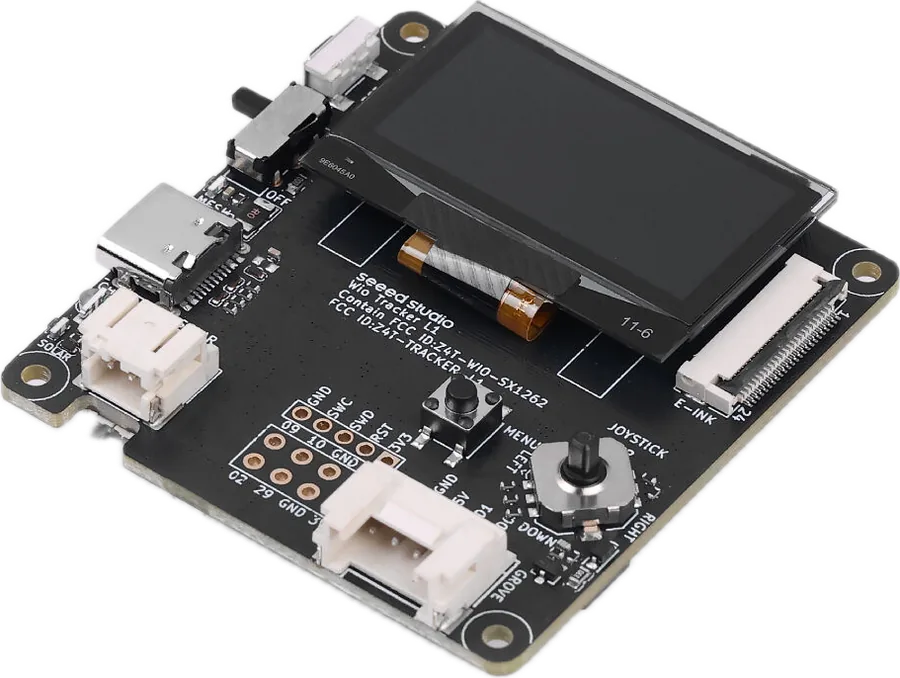
Solar connector
2-pin, 2.0 mm pitch; maximum input remains 5 V
Battery sensing
P0.31 ADC; P0.04 measurement control
Grove signal pins
P1.11 / P1.12; firmware chooses UART, I²C or GPIO use.
OLED I²C pins
SDA P0.06; SCL P0.05
Buzzer and LED pins
Buzzer PWM P1.00; mesh LED P1.01
Expansion header
2 × 4, 2.54 mm pitch; SWD test points use 2.0 mm pitch.
Firmware & setup
8
Firmware
Meshtastic preinstalled; L1/Lite/Pro use Wio Tracker L1 target; E-Ink has its own target
Updates
USB DFU/UF2 workflow; Seeed specifically warns against NRF-OTA updates
Sensor support
Maker-tested: BMP085, MCP9808, PCT2075, SHT31/SHTC3/SHT4X, AHT10, BME280, MAX30102 and CardKB.
Newer controls
Guide documents menu/virtual keyboard in firmware 2.7; four-way joystick support is specifically L1 E-Ink alpha firmware.
First power-up
Connect USB to activate the board, then move the power switch upward.
Client connections
Phone over Bluetooth; web client over Bluetooth or USB serial
Region setup
Configure the region for your location before using the mesh.
On-screen telemetry
Enable sensor telemetry and its display option to show readings on the OLED.
No matching specification. Try a chip name, connector or feature.
What still needs checking
The wiki’s battery connector table and adapter-cable note disagree on pitch; verify the connector before ordering a battery. The setup guide advises against fast chargers despite promotional “fast charging” wording.
The block diagram covers several L1 models and assigns some GPIOs to multiple functions. Do not combine joystick, Grove and radio/GNSS pin labels without checking the exact model and firmware.
The guide’s written buzzer on/off steps appear reversed. They are not reproduced as reliable instructions.