TechxArtisan
Openterface Mini-KVM Toolkit
Configure or recover a nearby headless computer.
KVMHDMI captureUSBHomelab
- Price
- $129at crowdsupply.com
- Availability
- Listed
- Design
- Open
Where to buy · 3 shops
- Bring along
- A host with the Openterface app and a powered target with HDMI output and USB control.
- Keep in mind
- 1080p30 capture; older BIOS USB-hub compatibility varies.
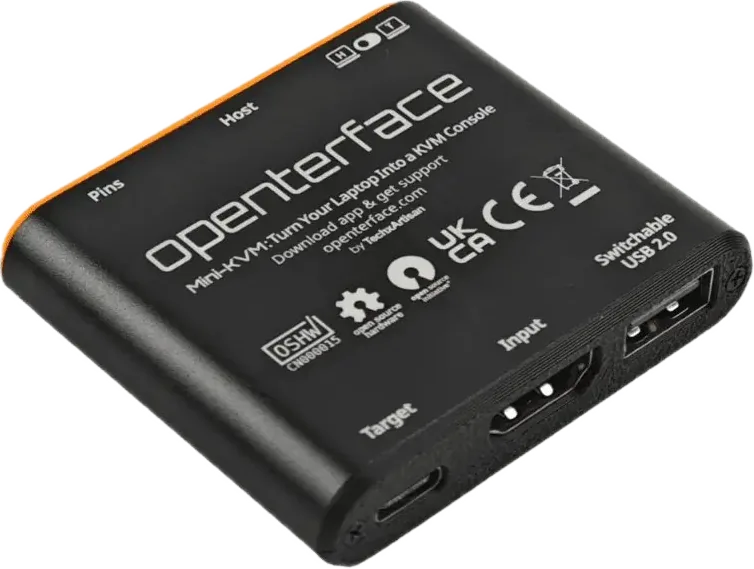
Image credit
Maker image · Openterface Mini-KVM unit; toolkit accessories are not shown. · TechxArtisan / Openterface(02) Blueprint
Build it yourself
TechxArtisan publishes full v1.9 PCB Gerbers, schematic PDF, BOM and a STEP model under CERN-OHL-S-2.0 in a dedicated hardware repo; the Openterface_QT host app is separate open-source software.
PCB 3D model v1.9 (STEP)
Read straight from the maker’s repository. Open on GitHub
Design files 5
Source 2
- TechxArtisanStudio/Openterface_Mini-KVM_HardwarehardwareCERN-OHL-S-2.0298
- TechxArtisanStudio/Openterface_QTsdkAGPL-3.0164
git clone https://github.com/TechxArtisanStudio/Openterface_Mini-KVM_Hardware.gitResearch notes
All links curl-verified 200. v1.9/PCB1.11 is the newer of two revisions in the repo (v1.6 files also present).
Every link checked 2026-09-27.
Hand this device to your agent. Everything on this page, as clean Markdown and JSON: specs, shops, prices, design files, parts.
Made the Openterface Mini-KVM Toolkit? Put the badge on your README; it links here, with every shop that sells it.

Specifications
Exact package
5
Connect and use
9
Software and design files
4
No matching specification. Try a chip name, connector or feature.
What still needs checking
- The datasheet calls port ② a host connection; the dedicated connection guide identifies it as target keyboard/mouse output. This profile follows the connection guide.
- The toolkit SKU does not establish the shipped PCB revision or capture firmware. Record both before publishing a tested setup.
- The site navigation advertises an iPadOS app, while the dedicated app page lists four other platforms. iPad host requirements remain unverified here.
- No exact recovery binary, universal BIOS compatibility, measured latency or adapter compatibility was tested.
- Repository documentation has a stated CC BY-SA license; the scope of any selected product photo still needs an asset-level record. The media index includes third-party content.
- Price, regional fulfillment and current checkout stock remain unverified.