Great Scott Gadgets
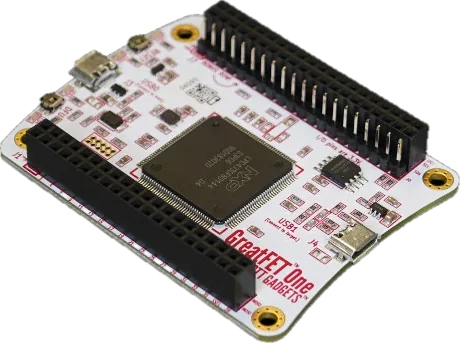
GreatFET One Connect Python tools to digital buses, GPIO and custom USB experiments.
Build & code
Bring along Host software, USB cable, test leads and any required neighbor board.
Keep in mind Expansion boards and enclosure are sold separately. Source checked · Sep 16, 2026 Image credit Maker product image · Great Scott Gadgets
Overview Blueprint 4 Specifications 22 Resources 6
(02) Blueprint
Build it yourself GreatFET One's full KiCad schematic/PCB and an acrylic-case SVG are published under BSD-3-Clause; a community pinout site documents the header.
1 git clone https://github.com/greatfet-hardware/azalea.git
Research notes Verified repo (BSD-3-Clause, 98 stars) and file tree via `gh api`; confirmed LPC4330FBD144 by grepping raw azalea.sch content for the part number. azalea.kicad_pcb/azalea.sch note: repo also has an azalea.kicad_pro but no kicad_sch, i.e. schematic is Eagle-format .sch, PCB layout is KiCad.
Every link checked 2026-09-27.
Hand this device to your agent. Everything on this page, as clean Markdown and JSON: specs, shops, prices, design files, parts.
Made the GreatFET One? Put the badge on your README; it links here, with every shop that sells it.
Copy Markdown
Board & interfaces 8 Design Azalea / GreatFET One; LPC4330 MCU and 2 MB flash Expansion J1/J2: 80 pins; J7 bonus row: 20 pins Host USB USB0 high-speed connection to the computer Target USB USB1 full-speed port with host/device power switching Digital tools GPIO, SPI, I²C, UART, JTAG and logic capture Analog ADC/DAC access through the Python API Controls Four LEDs, DFU and reset buttons Hardware debug J5 Cortex JTAG/SWD header footprint is unpopulated Electrical setup 5 I/O voltage Expansion signals use 3.3 V except pins explicitly noted otherwise Neighbor power Onboard 3.3 V regulator can supply some neighbor power Pin mapping Use the Azalea header tables or interactive pinout for each function ADC/DAC pin Default analog interface is J2 pin 5; DAC is 10-bit Required connections Connect the host to USB0; use leads appropriate to target pins Software & package 9 Host runtime Python 3.9 or later, per current getting-started guide Install Python package: greatfet; Linux access rules documented Check connection greatfet info reports detected board and firmware Update pairing Upgrade host tools, then use the documented firmware autoflash step Logic capture example Documented four-channel 2 MSPS capture to a Sigrok file; not a maximum rating API discovery greatfet info -A lists APIs provided by installed firmware Included USB cable, ESD bag and neighbor-separation tool Separate accessories Neighbor boards and enclosure are sold separately Recovery ROM USB bootloader supports firmware loading without an external programmer No matching specification. Try a chip name, connector or feature.
What still needs checking Not every expansion pin is a general-purpose digital signal. Check the pin table before connecting a target. Maximum neighbor current, complete ADC performance, dimensions and weight were not established here. Software APIs and example rates are firmware-dependent. No target wiring, capture or Facedancer workflow was tested.
Downloads & docs
From the original makers Build with GreatFET One Source & revision notes Maker listing checked Sep 15, 2026. Detailed documentation reviewed Sep 16, 2026. Not hands-on tested.
Price is a dated listing; confirm with the maker.
The maker documents digital I/O, serial interfaces, logic analysis and analog I/O. Available functions depend on firmware and the chosen host API.
GreatFET neighbors add capabilities; this entry does not assume any expansion board. It is distinct from Cynthion and YARD Stick One.
Exact-model setup, electrical limits and revision resources were reviewed on 2026-09-16. Detailed rows retain their primary sources; listed prices keep the earlier check date.
Price is Lab401's euro listing on 2026-09-18, not the maker's own price; both variants were in stock.
A neighbor board’s features do not become built-in GreatFET One capabilities.
Build or list hardware with us GreatFET One Great Scott Gadgets
Buy