Gadgets.sh

Arduino

Arduino UNO R4 WiFi

Prototype controls, sensors and small connected displays.

Build & codeBluetooth LE

In stock at Arduino when checked on 2026-09-24.

Bring along
USB data cable, Arduino tools and voltage-compatible components.
Keep in mind
UNO R4 firmware and libraries are not universally interchangeable with UNO R3.
Source checked · Sep 16, 2026
Arduino UNO R4 WiFi
Image creditMaker product image · Arduino

(02) Blueprint

What’s published

Schematics published

Arduino publishes an official schematic PDF, full pinout PDF and datasheet PDF for the board; no editable Eagle/KiCad source files were found.

Research notes

All three docs.arduino.cc PDFs returned HTTP 200. No arduino/* GitHub repo with Eagle/KiCad source for this specific board was found (searched GitHub for ABX00087 and "uno r4" eagle/kicad — no hits), so classified as schematics-only rather than open-hardware.

Every link checked 2026-09-27.

Hand this device to your agent. Everything on this page, as clean Markdown and JSON: specs, shops, prices, design files, parts.

Made the Arduino UNO R4 WiFi? Put the badge on your README; it links here, with every shop that sells it.

gadgets.sh badge

Specifications

Processors & display

6
Main MCU
Renesas RA4M1 Cortex-M4F, 48 MHz
Main memory
256 KB flash, 32 KB SRAM, 8 KB data EEPROM
Wireless MCU
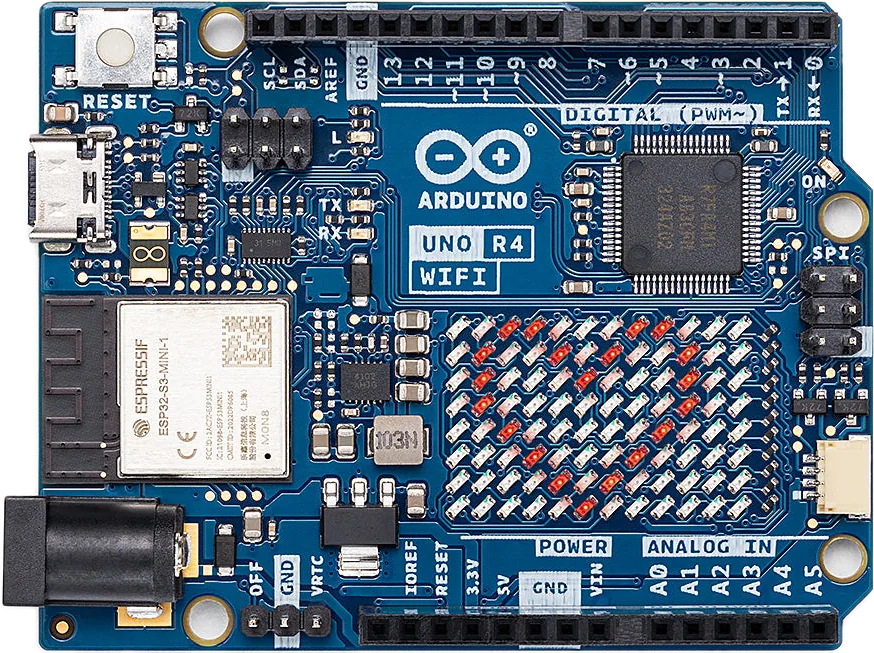
ESP32-S3-MINI-1-N8; separate 3.3 V processor
Wireless
2.4 GHz 802.11b/g/n and Bluetooth 5 LE
Bluetooth software
UNO R4 WiFi is on Arduino’s supported BLE list; no Classic support claim
Display
12 × 8 red LED matrix

Pins & power

8
I/O
14 digital pins and six analog inputs
Logic levels
Main headers: 5 V; ESP header and Qwiic: 3.3 V only
GPIO current
8 mA maximum per RA4M1 GPIO; power motors separately
I²C
Wire on A4/A5; Wire1 on the 3.3 V Qwiic connector
SPI / UART
SPI on D10–D13 or ICSP; UART on D0/D1
CAN connection
D13 receive / D10 transmit; external transceiver required
ADC / DAC
Up to 14-bit ADC; 12-bit DAC on A0
Supply input
USB-C: 5 V; VIN/barrel jack: 6–24 V

Setup & recovery

7
IDE setup
Install Arduino IDE 2 and the UNO R4 board package; select WiFi model
Programming cable
USB-C data cable; board registration is optional
Connectivity firmware
IDE 2.2.1+ has Tools → Firmware Updater for the ESP32-S3 bridge
After updating
Updater overwrites the sketch; unplug/reconnect before uploading again
Bridge recovery
Use the board-specific espflash recovery if USB identification is lost
Library migration
Check the UNO R4 compatibility list before reusing AVR code or shields
Hardware files
Published pinout, schematic, CAD and STEP downloads
What still needs checking
  • The user manual overview says CAN D4/D5, but its pinout, schematic and dedicated WiFi CAN tutorial identify D13/D10. This profile follows the dedicated tutorial.
  • Use a transceiver whose logic levels and supply match the board. A board name alone does not establish compatibility with a CAN module or shield.
  • The main MCU sketch and ESP32-S3 USB/connectivity firmware are separate; arbitrary ESP firmware can remove the bridge.
Arduino UNO R4 WiFiArduino
Buy

Share this device